MapScript is the Scripting System used by MadBomber to create dynamic behavior for maps, such as Respawning Powerups, Timed Map Modifications, general Object Spawns and various Events. These actions can be triggered by player interaction or timers.
Basic Structure
MapScript builds upon this basic structure, which should be known by mappers to get the most out of MapScript.
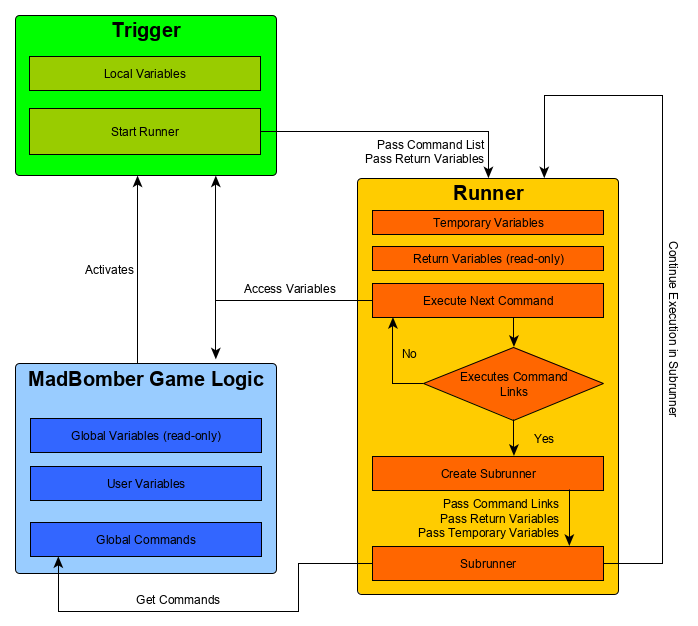
Diagram: Simplified MapScript execution flow
There are several places where commands can be defined. First of all, there’s the global commands List, which contains commands that can be executed via a Link from anywhere within MapScript. Additionally, Commands can be defined within every trigger, making them only accessible from within that trigger. Therefore, Global Commands should be used for any command that will likely be used multiple times. Certain Commands will have a set of Command Links as Parameters, such as IfCondition and LoopCommand. There is also a LinkCommand for simply executing Command Links in any context. The LinkCommand can also be used for grouping global commands.
Most Commands have multiple parameters. These can be set to a static Value or have a variable inserted. It is also possible to specify a mathematical operation as a parameter, which will then be calculated as needed. Users can create their own variables using the User Variables Tab inside the MapScript Editor. User Variables can then be modified using the SetVariable command. These variables can then be inserted into any Command parameter (except for Variable Names) by enclosing the variable Space and name in Percent signs, like this:
%S_VariableName%
While “S_” Represents the space (available spaces listed below), “VariableName” is the actual name of the variable. The values will be numeric, usable for things such as remembering which player did a specific thing on the map or where exactly that thing occured.
Triggers are what cause the Commands to execute in the first place. There is a single list defining all Triggers for a single Map. The trigger defines a condition at which the Trigger should activate. See Trigger Types below for more Information. Once this condition is encountered, the trigger will activate.
When a Trigger is activated, a Runner is created with the Commands contained within the Trigger. If one of those Commands uses Command Links, a Subrunner will be created for executing the Linked Commands. Further Subrunners are created for each set of Command Links. A Runner will generally have all of its Commands executed within the same Frame it was created, unless a Delay Command is used. Using Delay will suspend the Runner at the current Point and wait for the specified amount of time before resuming Command execution.
Trigger Types
If no icon is present, it can be assumed that the trigger is not yet implemented.
There will be various different types of triggers to execute commands during a specific time or when certain requirements are met. A Trigger can return variables which can then be used within the commands that were executed by the corresponding trigger.
The following variables are returned by every Trigger: %R_CommandCount%
| ID | Trigger Type | Description | Returned Variables |
|---|---|---|---|
| 0x00 |  TimeTrigger TimeTrigger | TimeTriggers would be executed after a certain amount of time has passed ingame. | %R_TriggerTime% |
| 0x01 |  MapTrigger MapTrigger | MapTriggers would be executed once a certain condition on the Map is fulfilled. See Map Triggers section for more information. | %R_PlayerID%, %R_TileX%, %R_TileY% |
| 0x02 |  LoopTrigger LoopTrigger | LoopTriggers would be executed every X seconds, where X would be defined by the mapper. | %R_TriggerTime%, %R_LoopCounter%, %R_LoopDelay% |
MapTrigger Conditions
MapTriggers could be assigned to a specific Tile and optionally stretched across an area. A MapTrigger can check for any of the following conditions.
| ID | Condition | Description | Additional Returned Variables |
|---|---|---|---|
| 0x00 | PlayerPresent | Causes the trigger to activate once a Player walks onto the tile. | |
| 0x01 | BombPresent | Causes the trigger to activate once a Bomb is placed or moved onto the tile. | |
| 0x02 | FlamePresent | Causes the trigger to activate once a Flame is created on the tile. | |
| 0x03 | BlastCaused | Causes the trigger to activate once a blast is caused on the tile. This only activates if the tile in question is the origin point of the blast. | %R_BlastRadius%, %R_BurnTime%, %R_BlastType% |
| 0x04 | PowerupCollect | Causes the trigger to activate once a Powerup is collected on a tile. | %R_KeyID% |
| 0x05 | TileBreak | Causes the trigger to activate once a Tile is broken. Unlike flame present, this will only trigger once, right when the tile is broken. | |
| 0x06 | TileUnlock | Causes the trigger to activate once a LockedDoor is unlocked on the tile. | %R_KeyID% |
| 0x07 | PlayerHit | Causes the trigger to activate once a player gets hit on the tile. Does not activate if the player dies. | |
| 0x08 | PlayerDeath | Causes the trigger to activate once a player dies on the tile. |
Variables
Variables can be used for making maps even more dynamic by passing variables to Commands as arguments. Some variables will be available anywhere, some will be returned from Triggers. The mapper can also define Variables to be used for any purpose they see fit. They can be set or modified using various Commands.
The following global variables are available. These contain various information about the ongoing match.
| Variable Name | Description |
|---|---|
| %G_ElapsedTime% | Contains the amount of time that has passed since the start of the match in seconds. |
| %G_RemainingTime% | Contains the amount of time left before the match timer runs out. |
| %G_PowerupCount% | Contains the total amount of Powerups currently present on the map. |
| %G_AlivePlayerCount% | Contains the amount of players who are still alive. |
| %G_TotalPlayerCount% | Contains the total amount of players currently playing, dead or alive. |
| %G_BrokenTileCount% | Contains the total amount of tiles broken during the match. Tough bricks are counted twice if fully destroyed. |
| %G_PlacedBombCount% | Contains the total amount of bombs placed by any player during the match. |
| %G_MapSizeX% | Contains the total size of the map in the X direction (Horizontal). |
| %G_MapSizeY% | Contains the total size of the map in the Y direction (Vertical). |
Variable Spaces
There are different types of variables categorized into different spaces depending on their accessibility.
| Space | Prefix | Description |
|---|---|---|
| Global | G_ | Global variables, contains various Metadata about the ongoing Match, accessible anywhere inside MapScript. Read-only. Updated every Frame. |
| User | U_ | Variables that were defined by the user. Accessible from anywhere inside MapScript. Modifiable. Can have user defined overflow and underflow values. |
| Local | L_ | Variables that were defined by the user using the SetLocalVariable Command. Can only be used within the trigger it was set in. Modifiable. Shared between every runner from the same trigger. |
| Return | R_ | Variables that were returned from a Trigger or Command. Can be used within the Trigger it came from. Read-only. This variable space will be cloned for every runner. |
| Temporary | T_ | Variables that will be deleted once the Runner they were set in finishes. If a Runner creates a Subrunner, the Subrunner will receive a Clone of the Temporary Space from its Parent. Modifiable. |
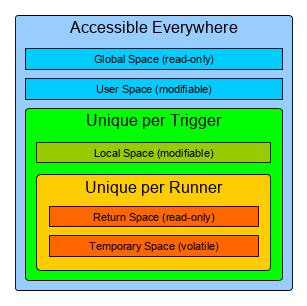
Diagram: Variable Space accessibility
Overflow & Underflow
Variables within the User space have a configurable Overflow and Underflow value. These values determine the Maximum and Minimum values for the variable respectively. If the variable is set outside these boundaries, it will either Overflow or Underflow.
For example, say you have a variable with Overflow = 20 and Underflow = 0. If this value is set to 21, it will Overflow to 0. If it is set to -1, it will underflow to 20. For numbers further out of the range, it will overflow or underflow further within in the range. For example, setting the variable mentioned before to 25 will make it overflow to 4. Setting it to -5 will make it Underflow to 16.
These properties can be used for continuous Loops that repeatedly increment or decrement a variable to prevent this variable from leaving a certain boundary.
Commands
If no icon is present, it can be assumed that the command is not yet implemented.
Commands can be used to modify the ongoing game in any way the mapper sees fit. This list describes the commands that will be available to use. Some commands are Actions that directly affect the ongoing Match, some are used for Flow Control and setting Variables.
| ID | Action Name | Parameters | Description |
|---|---|---|---|
| 0x00 |  ReplaceTile ReplaceTile | * X Position * Y Position * Tile ID | This will replace the specified tile with another tile. |
| 0x01 |  SpawnPowerup SpawnPowerup | * X Position * Y Position * Powerup ID | This will spawn a powerup on the specified tile. |
| 0x02 |  SpawnBomb SpawnBomb | * X Position * Y Position * Bomb Type * Blast Radius * Burn Time * Bomb Timer | This will spawn a bomb of a specific type with a specific blast radius and bomb timer in the specified location. |
| 0x03 |  SpawnTimeBomb SpawnTimeBomb | * X Position * Y Position * Timer Seconds | This will spawn a time bomb on the specified tile, which will go off after the specified amount of seconds. |
| 0x04 |  SpawnTimeDoor SpawnTimeDoor | * X Position * Y Position * Timer Seconds | This will spawn a time door on the specified tile, which will disappear after the specified amount of seconds. |
| 0x05 |  SpawnLockedDoor SpawnLockedDoor | * X Position * Y Position * Key ID | This will spawn a locked door on a specified tile, which can be unlocked with the specified Key ID. |
| 0x06 |  SpawnKey SpawnKey | * X Position * Y Position * Key ID | This will spawn a key with the specified ID on the specified tile. Can be used to unlock a locked tile. |
| 0x07 |  Blast Blast | * X Position * Y Position * Blast Type * Blast Radius * Burn Time | This will simply cause a blast in the specified area with the specified parameters. |
| 0x08 |  PlayerMessage PlayerMessage | * Message Text * Player ID * Duration | This will display a Text message below a player. |
| 0x09 |  TileMessage TileMessage | * Message Text * Tile X * Tile Y * Duration | This will display a Text message on a specific Tile. |
| 0x0a |  TickerMessage TickerMessage | * Message Text | This will display a Message inside the Match ticker visible to all players. |
| 0x0b | RemoveBomb | * Tile X * Tile Y | This will remove any bomb at the specified location. |
| 0x0c |  RemovePowerup RemovePowerup | * Tile X * Tile Y | This will remove any Powerup at the specified location, whether it is open or within a block. |
| 0x0d | RandomNumber | * Variable Name * Minimum Value * Maximum Value | This will set a variable to a random number generated with the synchronized RNG based off the current server seed. |
| 0x0e |  Delay Delay | * Delay Time | This will wait a certain amount of seconds before the next command is executed. This effectively suspends the runner until the frame at which the timer runs out. |
| 0x0f |  IfCondition IfCondition | * Operation * Value 1 * Value 2 * Command Links | This will execute one or more global commands if a certain condition is met. |
| 0x10 |  LoopCommand LoopCommand | * Loop Start * Loop End * Loop Increment * Command Links | This will execute one or more global commands repeatedly, returning the variable %R_LoopCommandCounter% to be used within the linked commands. The Loop counter will be incremented by the specified value every time it’s run. Once the Loop Counter goes above the defined Loop End Value, the Loop will stop. |
| 0x11 |  SetVariable SetVariable | * Variable Name * Value | This will change the value of a Variable within the User Space to another value. |
| 0x12 |  SetLocalVariable SetLocalVariable | * Variable Name * Value | This will change the value of a Variable within the current Triggers Local Space to another value. |
| 0x13 |  TeleportPlayer TeleportPlayer | * Player ID * Tile X * Tile Y | This will teleport a player with a specific ID to the specified location on the map. |
| 0x14 |  HitPlayer HitPlayer | * Player ID | This can be used to hit a player with a specific ID. |
| 0x15 |  KillPlayer KillPlayer | * Player ID | This will kill the player with the specified ID. |
| 0x16 | SuddenDeath | (none) | This will instantly trigger sudden death (if sudden death is enabled in game type). |
| 0x17 |  LinkCommand LinkCommand | * Command Links | This will run any Global Commands in the current context. Can also be used as a global Command for grouping a set of commands. |
| 0x18 |  StopRunner StopRunner | (none) | This will stop the current Runner/Subrunner. If execution is within a Subrunner, the commands of the Parent Runner will continue to execute. |
| 0x19 |  StopTrigger StopTrigger | (none) | This will stop all Runners of the current Trigger. Any commands after this one will not be executed. |
| 0x1a |  DisableTrigger DisableTrigger | (none) | This will permanently disable the current Trigger, which prevents it from activating until the end of the Match. Does not stop the runner. |
| 0x1b |  SetTemporaryVariable SetTemporaryVariable | * Variable Name * Value | This will change the value of a Variable within the current Runners Temporary Space to another value. |
IfCondition Operations
There are a Number of Operations that can be selected for the IfCondition Command. This determines the kind of check that is made.
| ID | Name | Description |
|---|---|---|
| 0x00 | LessThanValue | Will execute the Linked commands if Value 1 is less than Value 2. |
| 0x01 | GreaterThanValue | Will execute the Linked commands if Value 1 is greater than Value 2. |
| 0x02 | LessThanOrEqualToValue | Will execute the Linked commands if Value 1 is less than or equal to Value 2. |
| 0x03 | GreaterThanOrEqualToValue | Will execute the Linked commands if Value 1 is greater than or equal to Value 2. |
| 0x04 | EqualToValue | Will execute the Linked commands if Value 1 is equal to Value 2. |
| 0x05 | NotEqualToValue | Will execute the Linked commands if Value 1 is not equal to Value 2. |
| 0x06 | ValueEven | Will execute the Linked commands if the value is an Even Number. Value 2 is ignored for this operation. |
| 0x07 | ValueOdd | Will execute the Linked commands if the value is an Odd Number. Value 2 is ignored for this operation. |
| 0x08 | IsPlayerOnTile | Will execute the Linked commands if a player is present on a Tile. Value 1 is used as the X Position, Value 2 is used as the Y Position. |
| 0x09 | NoPlayerOnTile | Will execute the Linked commands if no players are present on a Tile. Value 1 is used as the X Position, Value 2 is used as the Y Position. |
| 0x0a | IsBombOnTile | Will execute the Linked commands if a bomb is present on a Tile. Value 1 is used as the X Position, Value 2 is used as the Y Position. |
| 0x0b | NoBombOnTile | Will execute the Linked commands if no bombs are present on a Tile. Value 1 is used as the X Position, Value 2 is used as the Y Position. |
| 0x0c | IsPowerupOnTile | Will execute the Linked commands if a powerup is present on a Tile. Value 1 is used as the X Position, Value 2 is used as the Y Position. |
| 0x0d | NoPowerupOnTile | Will execute the Linked commands if no powerups are present on a Tile. Value 1 is used as the X Position, Value 2 is used as the Y Position. |